How to Make a News Reel with Photos, Music, and AI Narration
A newsroom guide to choosing story photos, music, and AI narration without letting visual polish outrun accuracy or rights review.
Need help with your publication? Talk to SaraBiT Media
Quick answer
A news reel can combine concise slide text, a verified article photo, optional music, and an AI-generated voiceover. SaraBiT Media’s Reel Maker lets publishers choose from multiple AI voices without recording narration manually. Editors should confirm image and music rights and review the full reel before sharing.
Select photos that support the reporting
Use a story photo when it provides real context and is appropriate for the subject. Check that it depicts the event or person described, verify its source and credit, and avoid an image that could imply a detail the article does not establish.
When there is no suitable photo, a branded text-only background can be clearer than a generic or misleading image. A photo-to-reel workflow should preserve the relationship between the image and the story.
Use music only when it suits the story
Background music can change the tone of a reel. Decide whether it helps viewers follow the report or distracts from it, especially for serious or sensitive news. Confirm the usage rights for the specific platform and account before publishing.
A reel maker with music should make the audio choice deliberate. Do not assume that a track available inside one app is licensed for use in every export, channel, or commercial context.
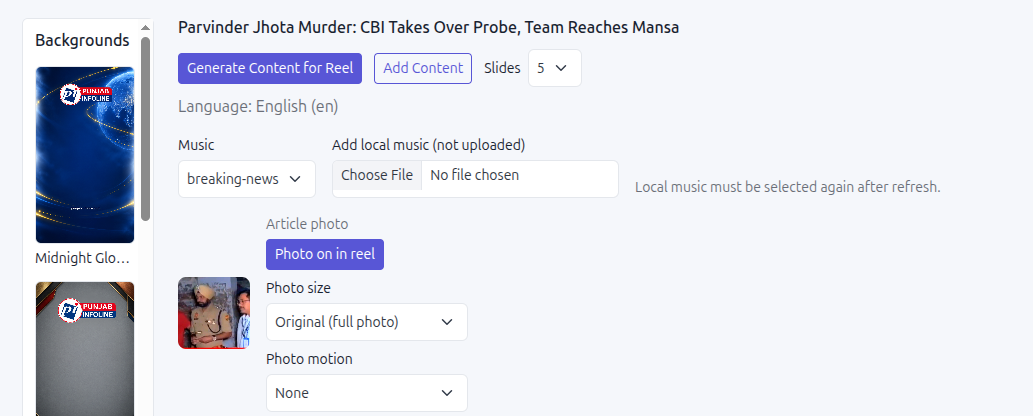
Add AI voiceover from the approved script
Write or review the slide copy first. SaraBiT Media’s text-to-speech feature can generate narration from the script and offers multiple AI voices, so a newsroom can create a spoken version without recording a voiceover manually.
Listen for pronunciation of names, places, figures, and abbreviations. Make sure the narration matches the visible text and the latest article. Keep text-only reels as an option when audio is unnecessary or a name cannot be rendered clearly.
Review the whole reel before distribution
Check visual order, text readability, article link, photo credit, music rights, and voiceover as one final review. Watch the complete file at phone size and at the intended playback volume. Assign one editor to approve the output and one owner to handle the final social post.
SaraBiT’s News Reel Maker brings slides, branding, photos, music selection, and AI voiceover into a publisher workflow. A demo can show how those choices fit together in your current content process.
How SaraBiT Media fits
Use SaraBiT Media to make branded story reels with editable slides, optional article photos and music, and AI-generated narration from multiple voices. Review rights and editorial accuracy before publishing.
Related Publisher Solutions
Move from research into the platform area most relevant to this guide.
More Publisher Guides
Browse related content on CMS selection, launch strategy, audience growth, and publishing operations.
Build a reel from one of your articles
Bring a story photo and an approved script. We can demonstrate the visual, music, and AI voiceover choices in the Reel Maker.