Turn Punjabi, Hindi and Other Regional-Language Articles into Social Reels
Reuse approved reporting to prepare short, branded reels in the language your audience reads, while keeping names, numbers, and context under newsroom review.
Need help with your publication? Talk to SaraBiT Media
Quick answer
A newsroom can create a regional-language reel from an existing article by selecting a clear story, preparing concise on-screen text in the publication’s language, applying its branding, and checking the rendered video. SaraBiT Media’s News Reel Maker works with Indian regional-language article content, including Punjabi examples. Voice and text-to-speech options depend on the configured language; confirm the required language and voice in a product demonstration.
Start with an article the newsroom has already checked
Choose an existing report that can be explained clearly in a few short slides. Keep the article as the source of truth and carry over its key facts, attribution, and qualifications. A reel should make the reporting easier to discover, not change what the article says.
For a regional-language audience, use the publication’s preferred script and spelling. Review people’s names, places, official titles, and transliterations against the source material before preparing the video.
Prepare readable slides in the audience’s language
Break the story into a clear opening, a few useful details, and a closing prompt to read the full report. Keep each slide concise and check that the font renders the chosen script correctly on a phone-sized screen. If the article is in Punjabi, Hindi, or another Indian language, have a fluent newsroom reviewer check meaning and spelling rather than relying on a literal translation.
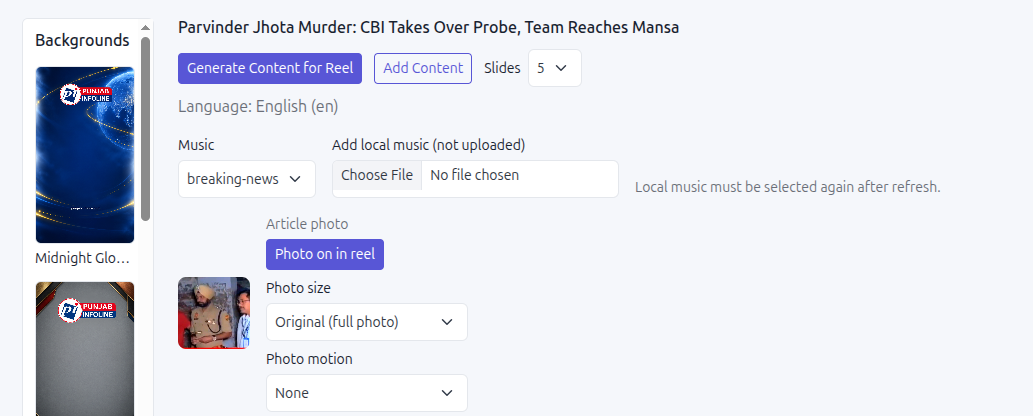
SaraBiT Media’s News Reel Maker creates reels from existing articles and lets the newsroom review and edit slide text and presentation. Use a relevant article photo or a branded background when it improves context.
Choose narration only after checking language support
A reel can use on-screen text without narration, or add text-to-speech voiceover when an appropriate option is available. SaraBiT offers AI-generated voiceover with multiple voices; the exact language and voice choices depend on the product configuration. Confirm the language your newsroom needs in a demonstration, and listen for pronunciation of names and regional terms.
A generated voice does not replace language review. Check the spoken script against the article and slides, especially for numbers, locations, and developing-news qualifiers.
Review the finished reel before sharing
Watch the complete video on a phone and confirm that regional text is readable, line breaks make sense, the voice matches the script if used, and images represent the story accurately. Assign a newsroom reviewer to approve the final export and decide how updates or corrections will be handled.
A short demonstration can use one of your published articles to check the script, font rendering, available voice options, branding, and export workflow together.
How SaraBiT Media fits
SaraBiT Media’s News Reel Maker turns existing articles into branded social reels and supports Indian regional-language text, including Punjabi examples. AI voiceover has multiple voice options; confirm the language and voice needed for your newsroom before relying on narration.
Related Publisher Solutions
Move from research into the platform area most relevant to this guide.
More Publisher Guides
Browse related content on CMS selection, launch strategy, audience growth, and publishing operations.
Try a regional-language article in a reel workflow
Bring one published Punjabi, Hindi, or other Indian-language article. We can review text rendering, slide editing, available voice options, and the final reel with your team.