A Repeatable Daily Workflow for Newsroom Instagram Reels
A lightweight routine helps a small team prepare and review news reels without leaving ownership and corrections unclear.
Need help with your publication? Talk to SaraBiT Media
Quick answer
A small newsroom can make daily reels manageable by selecting suitable stories, assigning one producer and one reviewer, drafting concise slides, choosing optional photos and AI voiceover, checking the final video, and recording who handles updates. SaraBiT Media supports article-based reels with editable slides and optional text-to-speech narration.
Choose stories during the desk planning step
Start with the day’s approved stories and select only those that can be explained clearly in a short video. Name the person preparing each reel and the editor responsible for review. Do not let a production target force every story into a visual format.
For developing news, identify which details are confirmed and how the reel will be updated if the article changes.
Draft, brand, and narrate from the article
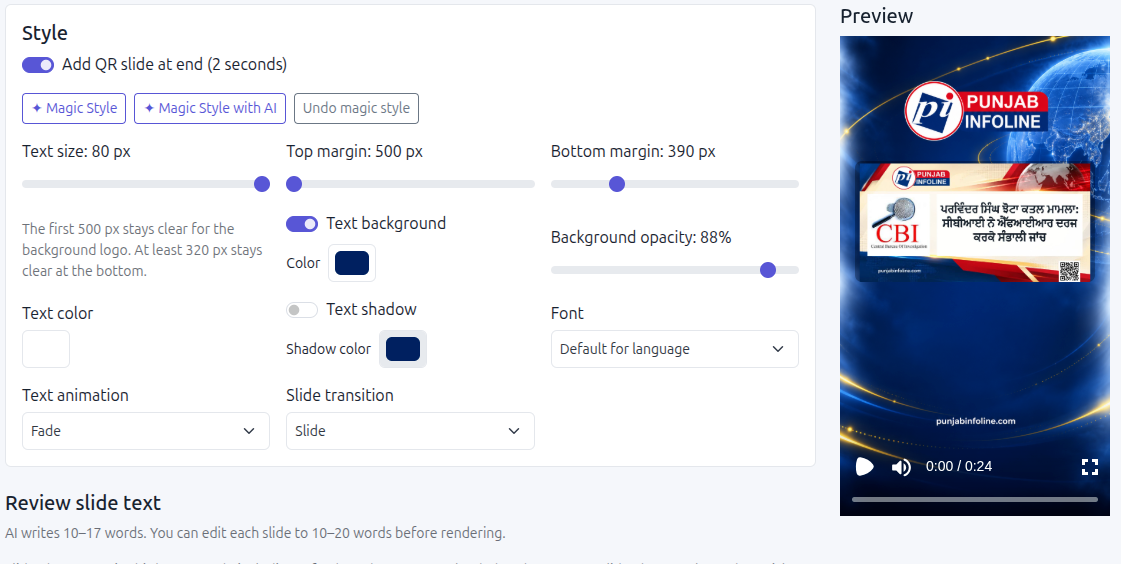
Prepare the key points from the current story. Use a newsroom-written slide sequence or review an AI-generated draft, then choose a branded layout and a relevant photo if one is available. SaraBiT Media’s News Reel Maker also offers text-to-speech narration with multiple AI voices, so staff can skip manual voice recording when they want spoken narration.
Keep the full story as the source of truth. The reel should lead readers into the reporting, not invent facts or remove qualifications that change its meaning.
Make the review short but specific
A compact review can check the headline, names, dates, figures, attribution, photo context, text size, narration, and link to the article. Listen to the full voiceover and watch the exported reel on a phone before approval.
If a story needs a correction, decide who checks the reel and who informs the person managing distribution. Keep the approved file and any later version clearly identified.
Review the routine after one publishing cycle
After a week, ask which steps saved time, where staff waited for approval, and whether the reels were clear to the audience. Adjust the number of stories, review owner, or templates based on what the team learned.
A product demonstration can follow one story through the article, reel draft, AI voiceover, editor review, and export so the newsroom can see how the workflow fits its own shift.
How SaraBiT Media fits
SaraBiT Media’s News Reel Maker supports article-based slides, optional AI drafts, photos, and text-to-speech narration with multiple AI voices. Confirm the export and distribution steps for your newsroom.
Related Publisher Solutions
Move from research into the platform area most relevant to this guide.
More Publisher Guides
Browse related content on CMS selection, launch strategy, audience growth, and publishing operations.
Map a daily reel routine for your team
Bring one recent story and the roles in your newsroom. We can walk through draft creation, voiceover, review, and export.