How Can Editors Use AI Drafts for News Reels?
SaraBiT can draft slide text for a news reel. Editors remain responsible for checking the facts, emphasis, and final presentation.
Need help with your publication? Talk to SaraBiT Media
Quick answer
SaraBiT’s News Reel Maker lets a newsroom write reel slides itself or start with an AI draft. Editors should check it against the published story, correct names and figures, choose the sequence, and decide whether to add an AI-generated voiceover from multiple voices. A text-only reel is also an option.
Start from the approved story
A short reel should carry the facts readers need, not every detail from the article. In SaraBiT, a newsroom can write the slide text itself or use the optional AI draft to get a first sequence on screen. Either way, the published article remains the reference for names, dates, amounts, locations, and attribution.
Use the draft to speed up the first pass, not to skip the editor. Check that each slide preserves the story’s meaning and that the opening does not overstate what the reporting establishes.
Review each slide before export
Read the reel from the first slide to the last. Remove repeated points, shorten lines that crowd the screen, and keep essential context close to the claim it qualifies. If new information changes the story, revise the slides before creating a new version of the reel.
SaraBiT’s reel workflow combines editable slides, optional article photos, and an optional text-to-speech voiceover with multiple AI voices. Editors can keep the presentation text-only or generate narration without recording it manually; they should review wording, names, numbers, and pronunciation before sharing.
Keep the reel consistent with the article
Treat the reel as another presentation of the reporting. Confirm that its headline, figures, names, and images match the current article. When the article is corrected, review any reel already prepared for distribution and update it where needed.
A quick editorial handoff can assign one person to verify the article and another to review the reel. That makes the new format useful to the newsroom without treating automated drafting as editorial approval.
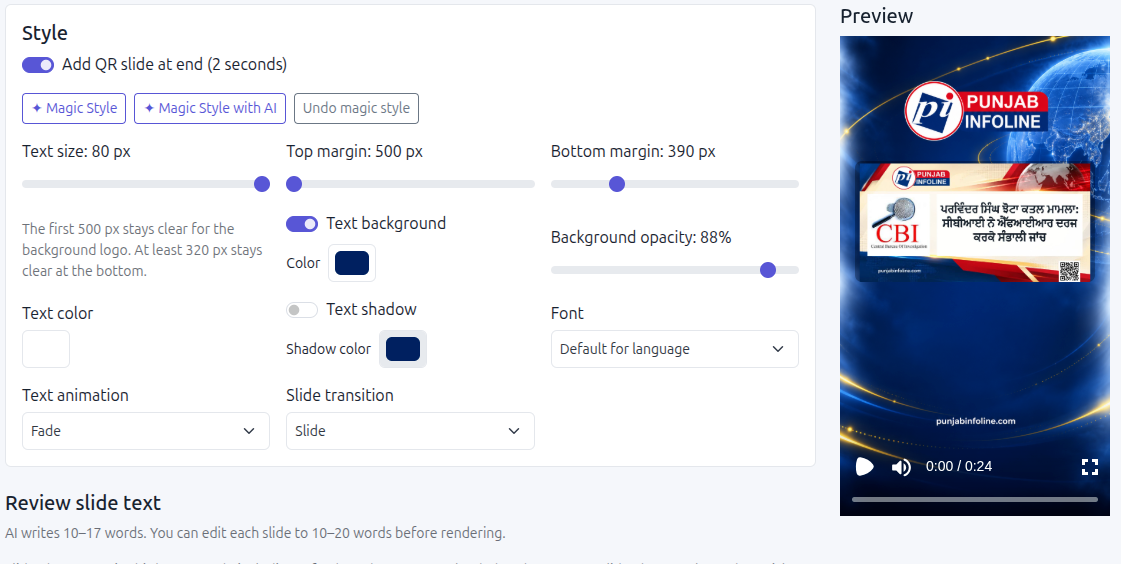
See the AI draft and editor review together
In a SaraBiT demonstration, bring a published story and compare manual slides with the optional AI draft. Then generate a text-to-speech voiceover, select from the available AI voices, and review the final reel against the story.
This gives editors a practical way to decide whether AI drafting belongs in their workflow while keeping publication decisions with the newsroom.
How SaraBiT Media fits
SaraBiT’s News Reel Maker supports manually written slides or an optional AI draft, optional story photos, and text-to-speech narration with multiple AI voices. Editors can keep the reel text-only and should review the final wording and voiceover.
Related Publisher Solutions
Move from research into the platform area most relevant to this guide.
More Publisher Guides
Browse related content on CMS selection, launch strategy, audience growth, and publishing operations.
Review an AI reel draft against your story
Bring one published article. We can show the manual and AI-draft paths in SaraBiT’s News Reel Maker and walk through the editor review.