
Publisher Insight
How to Turn News Articles into Branded Reels Without a Dedicated Video Team
A small newsroom can create a useful visual summary from reporting it has already completed. The essential work is choosing the facts, shaping readable slides, and reviewing the finished reel.
Talk to SaraBiT Media
Discuss your newsroom workflow, search visibility, and publishing requirements with our team.
Quick answer
In brief
To turn a news article into a branded reel, select a verified story, reduce it to a few clear points, choose an appropriate photo or branded background, and preview the text and pacing. SaraBiT Media assembles reels programmatically from editable slides and visual templates; editors can write the text or review an AI-assisted draft.
Choose a story that survives a short summary
Start with reporting that has a clear central development and enough verified context to explain it briefly. A service update, local decision, sports result, or concise explainer can work well. A disputed allegation or complex investigation may need more context than a short slide sequence can carry.
Write down what the viewer must understand before opening the editor: what happened, where it happened, why it matters, and what remains uncertain. Keep the complete article as the reference. A reel should lead viewers toward the reporting rather than introduce claims that never appeared in it.
Build a short sequence with a purpose for each slide
For a hypothetical road-closure story, the first slide could identify the road and confirmed closure period. The second could explain the reason. The third could state an officially announced alternative route, if one exists. The final slide could direct viewers to the full report for details. Do not invent an alternative route just to complete the sequence.
Keep sentences short enough to read comfortably at phone size. Put one main point on each slide and retain qualifiers such as “proposed”, “expected”, or “according to” when they affect the meaning. Reduce repeated introductions before reducing factual context.
Use the Reel Maker to assemble the presentation
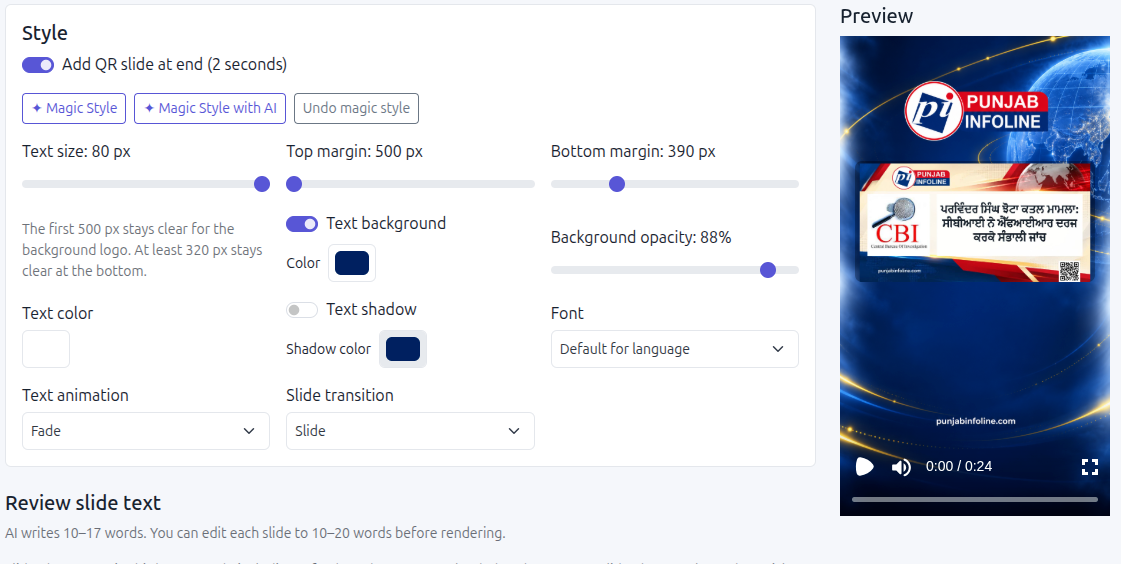
In SaraBiT Media, open the article, choose a branded vertical background, and prepare the slide text. You can write the slides yourself or begin with an AI draft and edit every line. Choose whether the article photo belongs in the reel, then review the typography, colors, and motion in the preview.
The video is assembled from the selected content and designed presentation elements. It does not require AI-generated video scenes or a spoken voiceover. A text-only background can be appropriate when there is no suitable documentary photo. Background music is optional, and any selected audio needs appropriate usage rights.
Make the brand recognizable without covering the story
Choose a small set of repeatable backgrounds, font treatments, and colors. Keep the publication identity readable and leave enough space for the headline. A familiar layout helps viewers recognize the source across successive stories without forcing every story into identical wording.
Check contrast against the actual photo, especially where bright skies or busy backgrounds sit behind text. Keep important words away from the edges and review the intended platform preview, where interface elements may overlap the video. Use an editor who reads the story’s language to check spelling, line breaks, and emphasis.
Review facts, images, and pacing before sharing
Compare names, numbers, locations, dates, and quotations with the article. Confirm that the selected photo depicts the relevant event or is clearly presented as an illustration. An AI-generated illustration should not be passed off as footage or a photograph documenting the event.
Watch the reel from beginning to end with the sound off. If the text cannot be read comfortably, simplify the wording or adjust the presentation. Recheck the finished output after a factual edit, and plan how a published reel will be corrected or withdrawn if the underlying story changes.
Measure newsroom effort as well as audience response
Record the time spent drafting, editing, reviewing, and preparing the reel for publication. Compare several ordinary stories before estimating savings. A difficult report should not be rushed to meet a production target, and an AI draft that needs extensive rewriting may not save time.
Review audience response alongside visits to the full story and the quality of returning readership. Reuters Institute research describes substantial news-video consumption on social and video platforms, but that does not guarantee visits or revenue for an individual publisher. Use a modest pilot to learn which stories and formats are worthwhile for your newsroom.
How SaraBiT Media fits
SaraBiT Media’s News Reel Maker gives publishers editable slides, branded backgrounds, optional article photos, styling controls, and an AI-assisted starting point when wanted. A demonstration with one of your own articles can show how the workflow fits your publication’s language and visual identity.
Further reading
Related Publisher Solutions
Move from research into the platform area most relevant to this guide.
More Publisher Guides
Browse related content on CMS selection, launch strategy, audience growth, and publishing operations.
Ready to Launch?
See your article as a branded news reel
Bring a published story and your brand requirements to a demonstration of the Reel Maker workflow.