Plan a News Reel Calendar Without Forcing Every Story into Video
A practical weekly plan helps a small desk balance story selection, production capacity, editorial checks, and timely updates.
Need help with your publication? Talk to SaraBiT Media
Quick answer
A newsroom reel calendar should list candidate stories, the audience need, reporting status, assigned producer and reviewer, expected publish window, and update owner. Keep space for breaking news and corrections, and do not require a reel for every article. Review the plan against staff capacity and story value each week.
Plan around the reporting, not a quota
Start with the newsroom’s upcoming coverage and identify stories that can be explained clearly in a short visual format. A calendar is a planning aid, not a target that requires every article to become a reel. Leave room for stories that need more reporting or are not suited to short video.
Mark which items are confirmed, developing, or only tentative. That helps the team avoid preparing a reel from a story that has not reached an editorially useful point.
Give each planned reel an owner and a review step
For each candidate, record the source article, intended audience, producer, editor, photo status, narration choice, and the person responsible for any later correction. This makes the handoff visible even when a small team shares several roles.
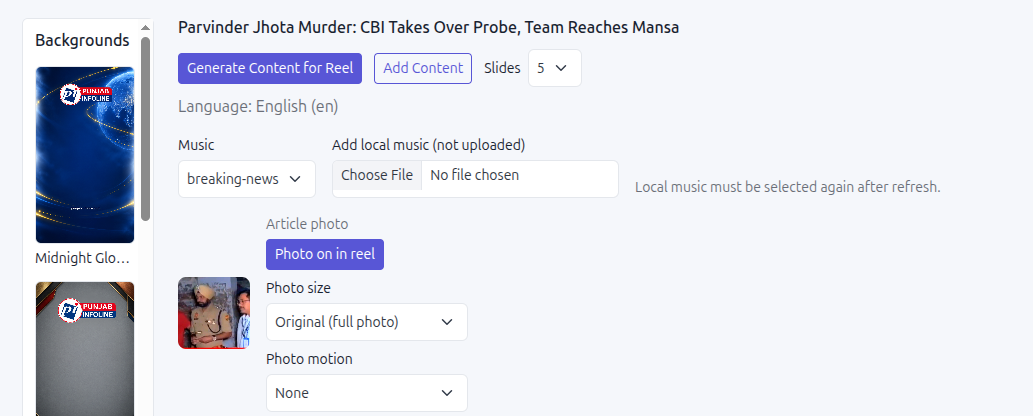
SaraBiT Media’s News Reel Maker supports article-based slides, optional photos, and AI-generated voiceover with multiple voices. The newsroom still decides which stories to include and who approves the final reel.
Keep the schedule flexible for breaking updates
Avoid filling every available slot in advance. Keep capacity for urgent verified coverage and identify how the team will pause, replace, or revise a planned reel when new information takes priority.
A calendar should also make corrections visible. If the source article changes, the owner can recheck the slide text, narration, caption, and any already prepared export before it is reused.
Review the calendar after publishing
At the end of the week, compare the plan with what the newsroom actually produced. Note which stories worked as reels, where approval took longer than expected, and which planned items were better served by an article or another format.
Use those observations to adjust the next plan and the team’s production capacity. A useful calendar protects editorial judgment while helping staff prepare visual stories consistently.
How SaraBiT Media fits
SaraBiT Media’s News Reel Maker can support a newsroom’s chosen article-to-reel workflow with editable slides, optional story photos, and AI voiceover. Confirm scheduling and distribution responsibilities separately.
Related Publisher Solutions
Move from research into the platform area most relevant to this guide.
More Publisher Guides
Browse related content on CMS selection, launch strategy, audience growth, and publishing operations.
Plan a reel workflow around your editorial calendar
Bring a typical week of coverage and your team roles. We can show how the News Reel Maker fits into your existing process.