Turn a News Photo into a Clear, Context-Rich Instagram Reel
Use a relevant, rights-cleared story photo as part of a short reel while keeping the reporting and context clear.
Need help with your publication? Talk to SaraBiT Media
Quick answer
To make a news reel from photos, select an image that accurately represents the story, add concise verified context, and review image rights, captions, and the final sequence. SaraBiT’s News Reel Maker supports optional article photos, editable slides, and AI-generated voiceover from multiple voices.
Choose a photo that adds real information
A photo can make a reel easier to follow when it identifies a verified person, place, or event. Start with an image connected to the article, confirm its source and usage rights, and avoid visuals that suggest an event or detail the reporting does not establish.
If no suitable image is available, a branded text treatment can be clearer than a decorative or unrelated photograph.
Build a short sequence around the image
Write the essential update in a few readable slides: what happened, where or when it happened, and what viewers should understand next. Keep qualifying details close to the claim they explain. Captions and on-screen text should agree with the article.
SaraBiT’s News Reel Maker lets publishers work with article slides and optional photos. Teams can write slide text or begin with an AI draft, then edit and review the finished sequence.
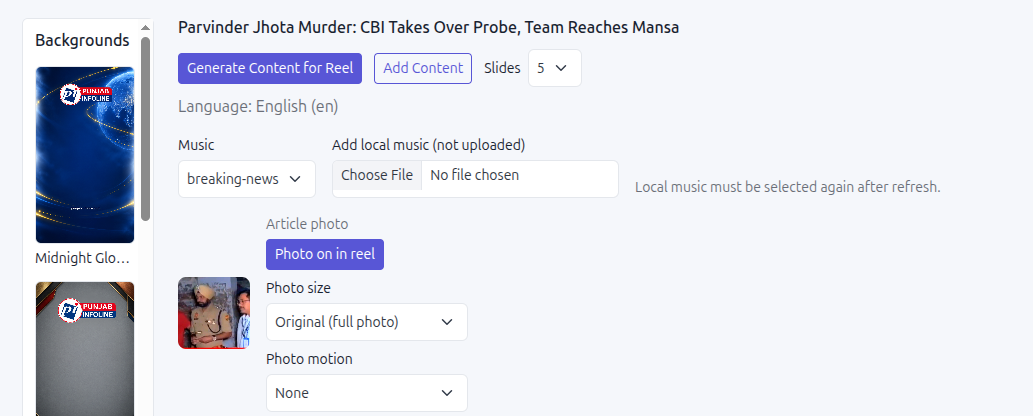
Decide whether narration helps
A photo-led reel can work with text alone. If spoken narration improves the presentation, SaraBiT can generate a text-to-speech voiceover from the script using multiple AI voices, so manual recording is not required. Listen for names, places, numbers, and pronunciation before approval.
Check the reel on a phone-sized screen and confirm the photo, text, and narration tell the same story.
Review before sharing
An editor should verify the image credit and rights, factual wording, readability, and any context lost in shortening the story. Keep the full article available for readers who need the complete report.
Use one approved story to compare a photo-based reel with a text-only version and decide which format best serves your audience.
How SaraBiT Media fits
SaraBiT’s News Reel Maker supports editable article slides, optional story photos, and optional text-to-speech narration with multiple AI voices. Editors review the final reel before sharing.
Related Publisher Solutions
Move from research into the platform area most relevant to this guide.
More Publisher Guides
Browse related content on CMS selection, launch strategy, audience growth, and publishing operations.
See your story as a photo-based reel
Bring an article with a suitable photo and review the slide, image, and optional voiceover workflow in SaraBiT.