No Camera Crew? Turn an Existing News Article into a Reel
A newsroom can make a useful reel without fresh footage by building a concise visual summary from the verified article and reviewing every slide before sharing.
Need help with your publication? Talk to SaraBiT Media
Quick answer
A publisher can create a news reel without filming new footage by selecting a verified article, turning its key points into concise on-screen slides, and using a relevant article photo or branded background when appropriate. Optional AI voiceover can narrate the text, or the reel can remain text-first. The newsroom should check accuracy, image context, script, and the final video before sharing.
Choose a story that works in a visual summary
Start with an article that has a clear development readers can understand in a few short frames. A reel made without new footage is useful for explainers, local updates, and verified developments where concise text and an existing image can provide enough context.
If the story depends on seeing an event, a person speaking, or a sequence of action, do not imply that still images tell the whole story. Link to the full report or use real footage when the visual evidence matters.
Build slides from the verified article
Reduce the story to a clear opening, a few essential points, and a path to the full article. Use an approved photo only when it is relevant and properly cleared; otherwise a publication-branded background with readable text can work. Keep names, numbers, attribution, and qualifications consistent with the article.
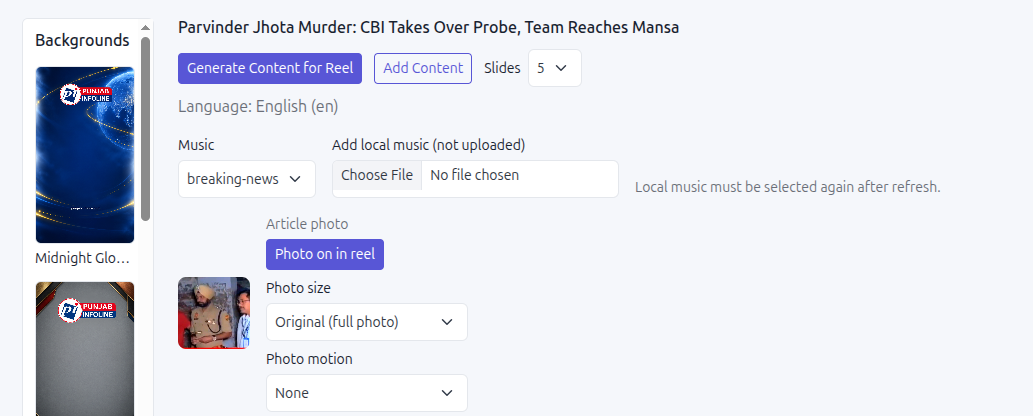
SaraBiT Media’s News Reel Maker creates an editable vertical reel from an existing article. Staff can use text-led slides, optional story photos, and an optional AI-generated voiceover with multiple voice choices, so recording footage or a manual narration is not required for every routine reel.
Review what the visuals communicate
Watch the rendered video on a phone. Check that the text is legible, any photo belongs with the story, and transitions or music do not make a serious report feel misleading. Listen to the voiceover if used and compare it with the approved copy.
Do not use a generic image in a way that viewers could mistake for evidence from the event. A simple branded slide is more transparent than a dramatic but unrelated visual.
Use the reel as a doorway to the report
The reel should give viewers a useful summary and a clear next step to reach the complete article. Add context in the caption where needed and use a destination link or account feature supported by the publisher’s channel setup.
A demo can show how one article becomes an editable text-first reel, how optional photos and voiceover fit the workflow, and where your editor checks the final version.
How SaraBiT Media fits
SaraBiT Media can prepare article-based social reels without requiring a new camera recording: editable text slides, optional article photos, branded backgrounds, and optional multi-voice AI narration are available, subject to newsroom review.
Related Publisher Solutions
Move from research into the platform area most relevant to this guide.
More Publisher Guides
Browse related content on CMS selection, launch strategy, audience growth, and publishing operations.
See an article become a reel without filming
Bring a published story that has no video footage. We can demonstrate the text-first workflow, optional photos and voiceover, and final review.