What Should a Newsroom Test in a Reel Maker Demo?
A useful product demo follows one of your own articles through drafting, editing, voice options, review, and export so the newsroom can judge the real workflow.
Need help with your publication? Talk to SaraBiT Media
Quick answer
In a news reel maker demo, test one or more real articles from your newsroom. Check how the tool builds editable slides, handles your branding and language, offers optional narration, and lets staff review the finished video. Ask which steps are part of reel creation and which remain with your social platform or analytics setup. Compare creation time and revision effort with your current process.
Bring stories that represent real newsroom work
Choose a routine report and a story with names, figures, or regional-language text. A polished sample can show the interface, but your own material reveals whether the slides, branding, and review steps fit the stories your team actually publishes.
Decide who will attend: a reporter or editor who knows the source story, the person responsible for social publishing, and anyone who checks the brand or language.
Test the article-to-draft steps
Ask to see the story entered or selected, the draft slides created, and how a user edits wording and presentation. Check whether important context survives the transformation and whether the content can be adjusted before export.
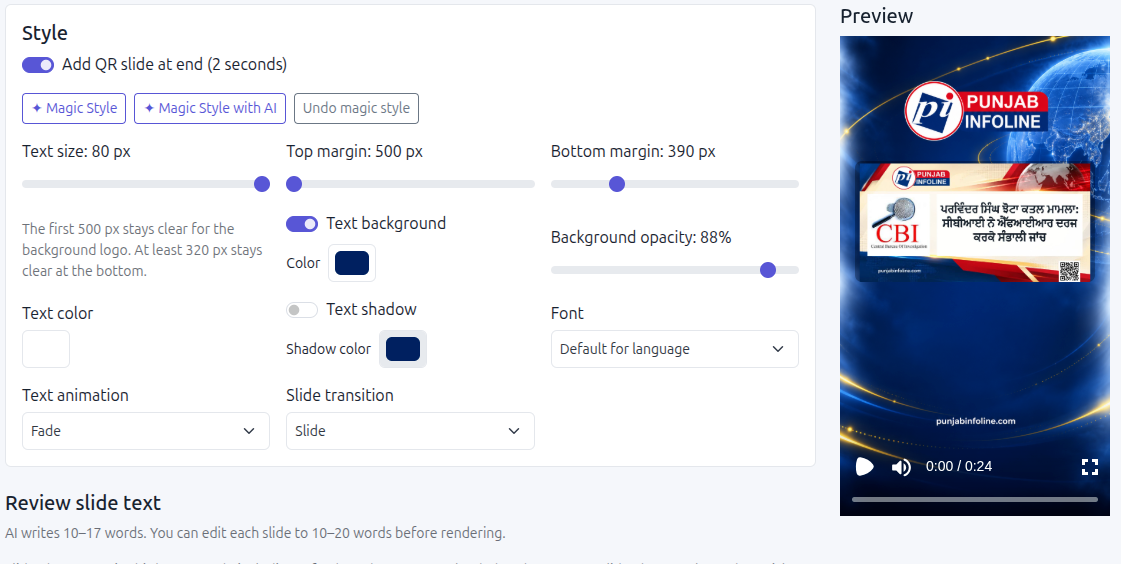
SaraBiT Media’s News Reel Maker works from existing articles, supports editable slides, and can create an AI draft. Ask the presenter to show the workflow with your material and point out which steps your team controls.
Listen to voice options and review the full video
If narration matters to your audience, test available AI voices with your actual script, including local names and numbers. Confirm which language and voice combinations are available for your configuration rather than assuming every language has the same options. Also check that text remains readable in a text-first reel.
Watch the complete rendered reel and compare it with the source article. Ask who reviews facts, images, pronunciation, and later changes before the video is shared.
Separate production from distribution and measurement
Ask what file or output is produced and which steps take place in the newsroom’s social account. Confirm whether publishing, scheduling, permissions, captions, and analytics are included or handled separately; do not infer them from the presence of an export button.
Record creation time, editing effort, review issues, and how easy it is to prepare a corrected version. A useful demo should help the newsroom decide whether the full workflow saves time and meets its editorial needs.
How SaraBiT Media fits
SaraBiT Media’s News Reel Maker can be evaluated with your own articles for editable slides, optional AI drafts, multiple voice options, language rendering, and final video review. Confirm distribution and analytics requirements separately.
Related Publisher Solutions
Move from research into the platform area most relevant to this guide.
More Publisher Guides
Browse related content on CMS selection, launch strategy, audience growth, and publishing operations.
Bring your own story to a product walkthrough
We can demonstrate the article-to-reel workflow using your material and answer questions about editing, regional text, voice options, review, and export.