From Press Release to News Reel: Verify the Story Before Posting
Use a press release as a reporting lead, verify its claims, and create the reel from the newsroom’s approved article rather than treating a source statement as confirmed news.
Need help with your publication? Talk to SaraBiT Media
Quick answer
To make a news reel from press-release coverage, treat the release as a source to verify, add reporting and attribution, and prepare an approved article first. Then create a concise reel from that newsroom article, preserving relevant qualifications and identifying claims as claims. Review the slides, images, narration, and final video before publishing.
Treat the release as a source, not an automatic story
A press release presents information from the organization that issued it. Check its claims, dates, names, figures, and supporting documents; seek independent context where the topic calls for it. Make clear which details come from the issuing organization and what the newsroom has independently confirmed.
Do not turn an unverified announcement into a definitive reel simply because the release is already written. The short format still needs accurate attribution and any important uncertainty.
Prepare the newsroom article first
Write or edit the newsroom’s own article after applying its reporting and verification process. Keep the article as the source of truth for the reel, including attribution and qualifications. Select only the points that can be explained without changing the meaning.
SaraBiT Media’s News Reel Maker creates reels from existing articles, so the publisher can start from its approved coverage rather than assuming the product directly verifies or publishes a raw press release.
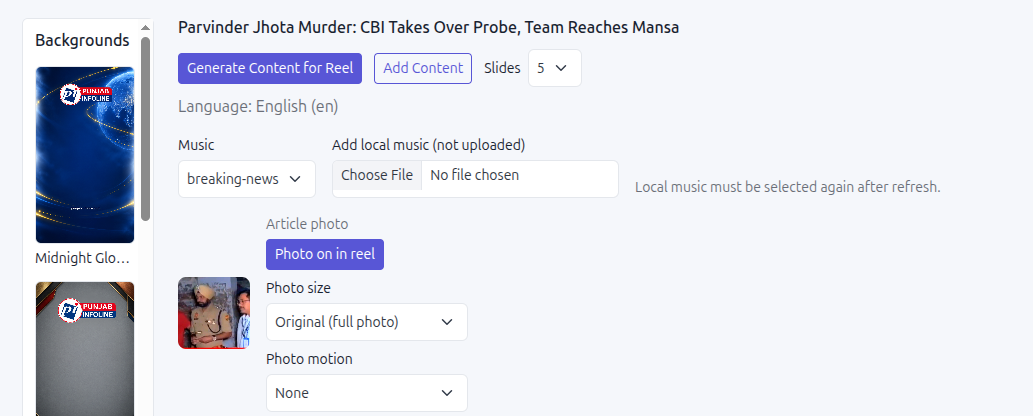
Make a short, attributed social summary
Use a clear headline and a few slides to explain the announcement and the newsroom’s reporting. Include attribution on-screen or in the caption where needed. Avoid promotional language from the source unless it is clearly attributed and relevant to the story.
Choose an image that accurately represents the subject and is cleared for use. Optional AI voiceover can read the slide text, but the newsroom should listen for attribution, names, numbers, and wording that could sound more certain when spoken.
Check updates against the article before sharing
Before publishing, compare the final reel with the approved article and confirm that the reporting has not changed. If new information arrives, update both the article and the reel or pause distribution until the discrepancy is resolved.
For a product walkthrough, bring an example release and its verified coverage. The demonstration can show the article-to-reel steps while your newsroom keeps responsibility for reporting and approval.
How SaraBiT Media fits
SaraBiT Media turns existing articles into editable social reels. The newsroom should verify the press release and publish its own approved coverage first; the reel tool does not independently verify source claims.
Related Publisher Solutions
Move from research into the platform area most relevant to this guide.
More Publisher Guides
Browse related content on CMS selection, launch strategy, audience growth, and publishing operations.
Turn your verified coverage into a reel
Bring a press release and the resulting approved article. We can demonstrate how your newsroom can prepare the social reel while preserving attribution and review.